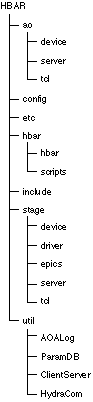
The directory structure of the source files is:
FIGURE 5.1 Directory Structure
This directory contains the software to implement the core of the adaptive optics subsystem: the real-time DSP code, the VxWorks modules to control the AO system and the Tcl functions to interface to the AO system.
This directory contains the real-time DSP code that runs on the Ariel Hydra-II boards and the VxWorks modules that control the real-time system. The DSP code is prefixed with dsp_ and the VxWorks code is prefixed with host_. The file device.c implements the API to the adaptive optics system. VxWorks functions in this file are called from the VxWorks command-line or from Tcl running on the SPARC via the AO server (contained in another directory). The VxWorks module AODevice.vx.o is generated from this source code.
This directory contains VxWorks and SPARC code. The VxWorks module implements the AO server, AOServer.vx.o. The SPARC code implement the client library used to communicate with VxWorks, libAOClient.a. The Tcl executable hbar uses the client library to send commands to the AO system via the server running on VxWorks.
This directory contains the Tcl library libAOTcl.a. This library implements the Tcl procedures that control the AO system.
This directory contains the run-time configuration files that are installed during a build. These configuration files are ASCII and are read by the GUI upon startup.
This directory contains VxWorks boot files used when the M68060 boots.
This directory contains the software that implements the Tcl interpreter used to control the AO system and run the Tcl/Tk-based GUI.
This directory contains the code to implement the Tcl interpreter for the HBAR system. The executable uses the standard Tcl extensions Tk, Tix and BLT. It also uses the Tcl libraries described in this section to control the AO system and Stages.
This directory contains all of the Tcl scripts used in the system. These scripts implement the GUI and perform system calibration and data display and analysis (outside of display and analysis performed by WaveLab).
This directory contains system-wide include files. These include files have compile-time constants for the software and macros used by other submodules.
This directory contains software for the Stage subsystem. These libraries and modules interface to the IMS stepper motor drivers and allow control of the stages from Tcl and VxWorks.
This directory implements the VxWorks module StageDevice.vx.o. This module is the lowest-level interface to the IMS drivers. This module controls the RS-232 connection to the stages and processes the stage commands and replies.
This directory implements the top-level VxWorks interface to the stage driver. The VxWorks module Stage.vx.o is defined here.
This directory contains the EPICS device driver support for the IMS stages. This code is installed into the EPICS tree to provide record support for the IMS483 stepper motor records.
This directory contains VxWorks and SPARC code. The VxWorks module implements the Stage server, StageServer.vx.o. The SPARC code implement the client library used to communicate with VxWorks, libStageClient.a. The Tcl executable hbar uses the client library to send commands to the stages via the server running on VxWorks.
This directory contains the Tcl library libStageTcl.a. This library implements the Tcl procedures that control the Stages.
This directory contains utility libraries that are used in other parts of the system.
This directory implements the AOA logger. This is a system to allow distributed tasks in the system to send error/status messages to one central location. The messages can then be show to the user to notify him/her of changes in the system. The logger daemon, AOALogd, is built in this directory. This daemon collects log messages and writes these to a file. This directory also contains the VxWorks and SPARC client code: AOALog.vx.o, libAOALog.a, libAOALogTcl.a. This libraries/modules are used to send messages to the log daemon and/or write these messages to the appropriate system console.
This directory implements the parameter database. This is a simple system to read ASCII parameter files containing key-value pairs. The parameters are then available to programs either via C routines or in Tcl. The libraries libParamDB.a and libParamDBTcl.a are built from this source code.
This directory implements a simple client/server system over TCP/IP with a serial access server. This library libClientServer.a contains the API for both client and server access on the SPARC. The module ClientServer.vx.o implements this API for VxWorks.
This directory contains the Hydra Communication library. This library consists of the VxWorks module HydraCom.vx.o and DSP library HydraCom.lib. These libraries are used by VxWorks tasks to launch and interact with programs running on the Ariel DSP's.
To build the distribution a copy of the sources must be obtained. This is done by checking the sources out of CVS. This will create a copy of the source tree in the current directory. Changes can then be made to the sources. To check out a copy of the source use the following command:
cvs co HBAR
This will create a directory named HBAR in the current directory. Note: The environment variable CVSROOT must be set to /usr/cvsroot. When the changes have been made and tested they should be committed using the command:
cvs commit
and then the copy deleted using the command:
cvs release -d HBAR
The sources require the program amake to build. Some notes about amake and the HBAR directory tree:
* The Makefiles are set up to build in the current directory and all subdirectories
* Binaries are placed in a subdirectory specific to the platform they run on: Solaris binaries in O.solaris, Ariel DSP binaries in O.x40, and VxWorks objects in O.vxworks.
* The files are not installed until the install target is executed: amake install
1. cd working-directory
2. cvs co HBAR
3. cd HBAR
4. edit sources, test changes
5. cvs commit
6. cd working-directory/HBAR
7. amake install
8. cd working-directory
9. cvs release -d HBAR